CoffeeShop - A Mod Manager for the Wii U and What Modern Homebrew Development Looks Like
The Wii U came out in 2012 and was largely considered a commercial failure. Nintendo moved on, shifted focus to the Switch and stopped caring about the platform. The modding community did not.
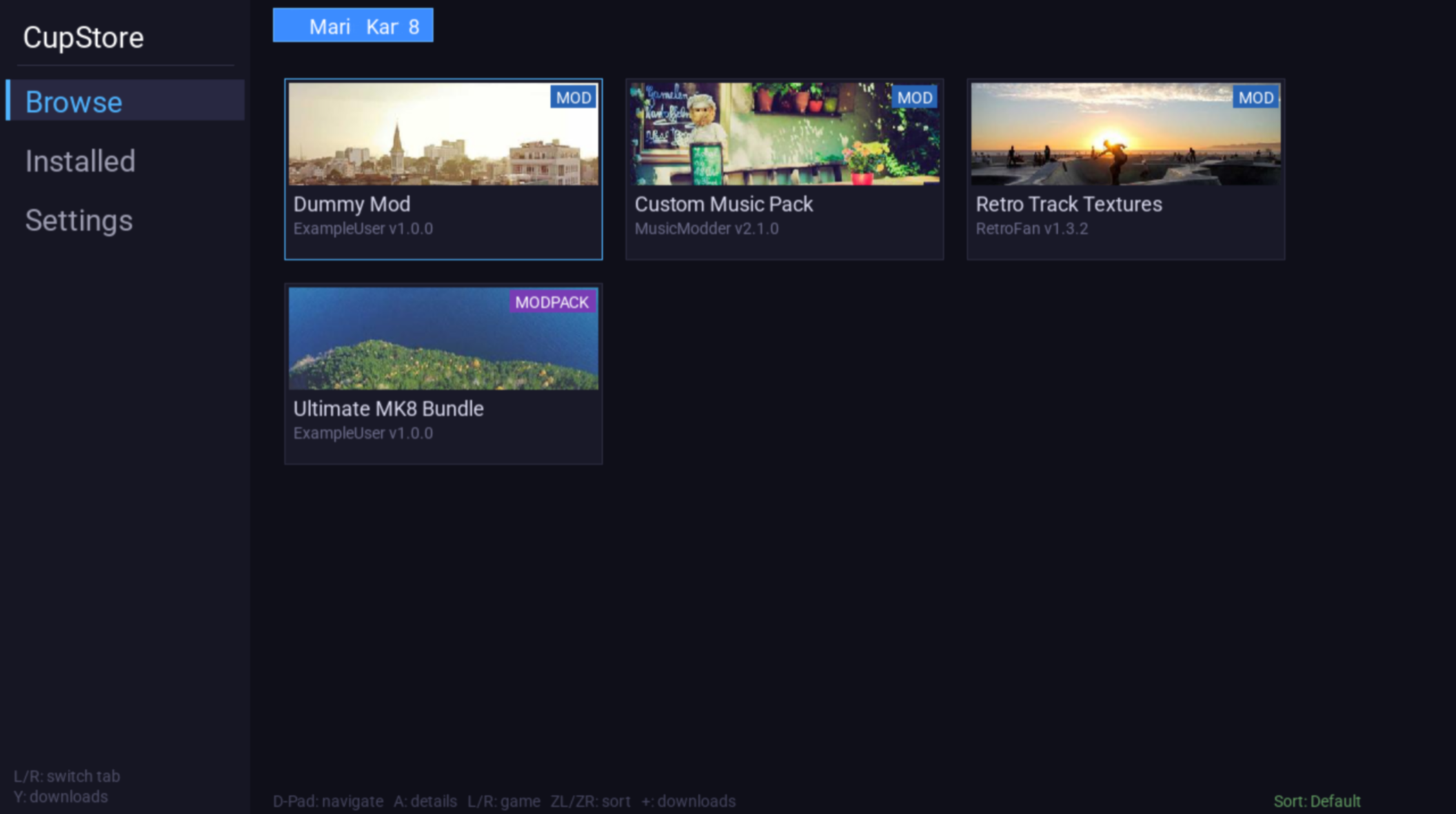
CoffeeShop is a mod manager for the Wii U. It runs directly on the console, connects to community-hosted repositories over Wi-Fi and lets you browse, download, install and manage SDCafiine mods without ever touching the SD card (Video tutorial). This post covers what that actually involved: the hardware, the toolchain, what it’s like to develop for a platform whose manufacturer actively doesn’t want you to and the various ways things broke before they worked. )
If you have never heard of Wii U homebrew before, that is fine. There is quite a bit of background worth covering before getting to the code.
What it does and why
Game mods on the Wii U work through a piece of software called SDCafiine – a plugin for Aroma (the custom firmware covered in a later section) that intercepts file reads during gameplay and redirects them to a folder on the SD card. When a game tries to load a model or texture from its internal storage, SDCafiine checks if there is a replacement file on the SD card first. If there is, it uses that instead. The original game data is untouched; the plugin just transparently swaps files at runtime.
The standard workflow for installing a mod is: download a ZIP on your PC, extract it, figure out the correct folder structure, copy it to the right place on the SD card, put the card back in the console and hope nothing went wrong. For trying a few mods that is fine. For managing many mods across multiple games, comparing versions or switching between them, it gets tedious.
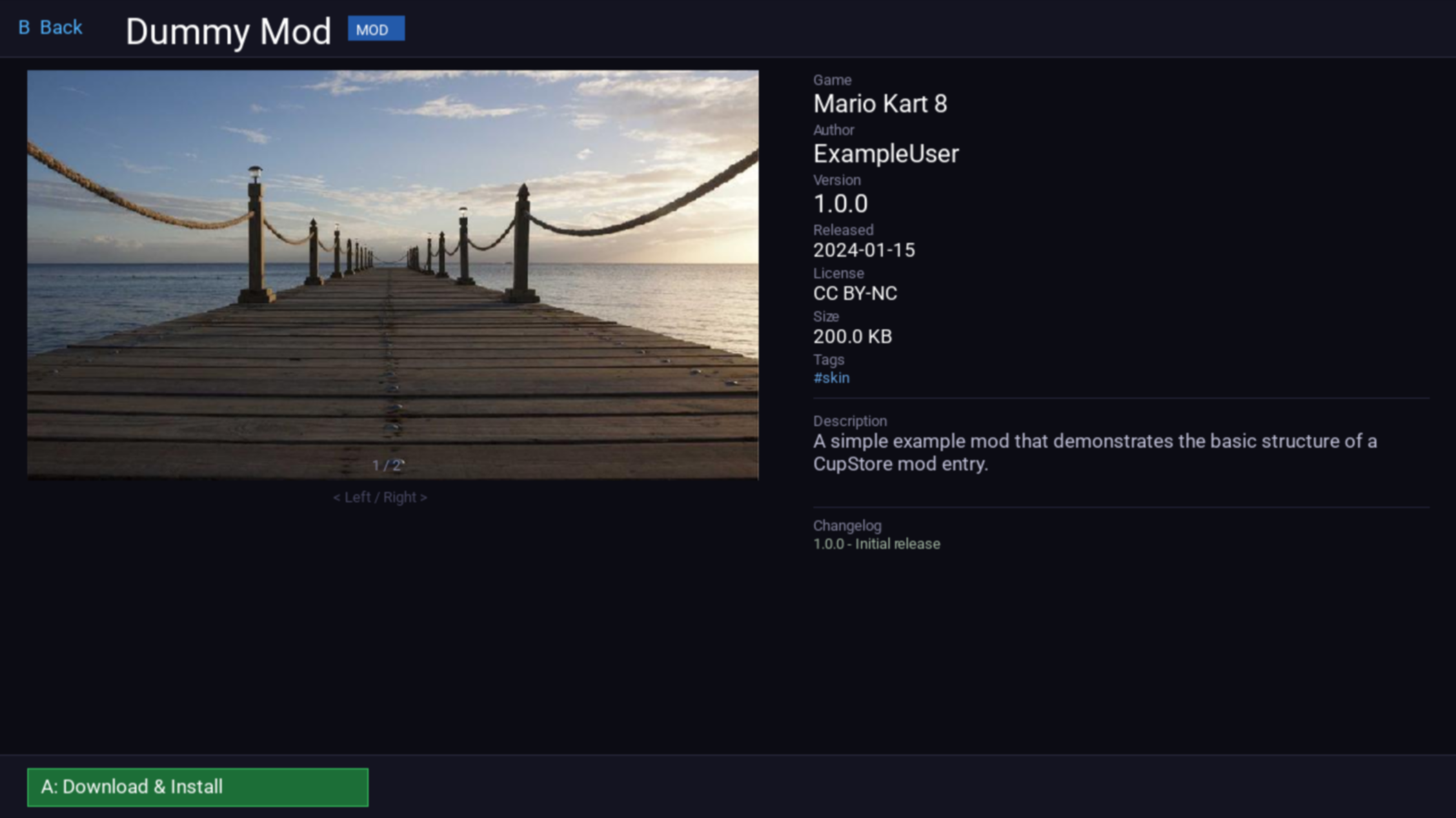
CoffeeShop manages the sdcafiine folder for you. It pulls metadata from structured JSON repositories hosted on static web servers, presents mods as a browsable UI, handles downloads and extraction, tracks what is installed, detects version updates and checks for file conflicts between active mods. All of this runs on the Wii U itself over the console’s built-in Wi-Fi.
The feature list:
- Browse and install mods from community-hosted repositories
- Per-game mod list with icons, tags and metadata
- Download queue with progress and error recovery
- Activate and deactivate mods without uninstalling
- Conflict detection between active mods
- Update badges when newer versions are available
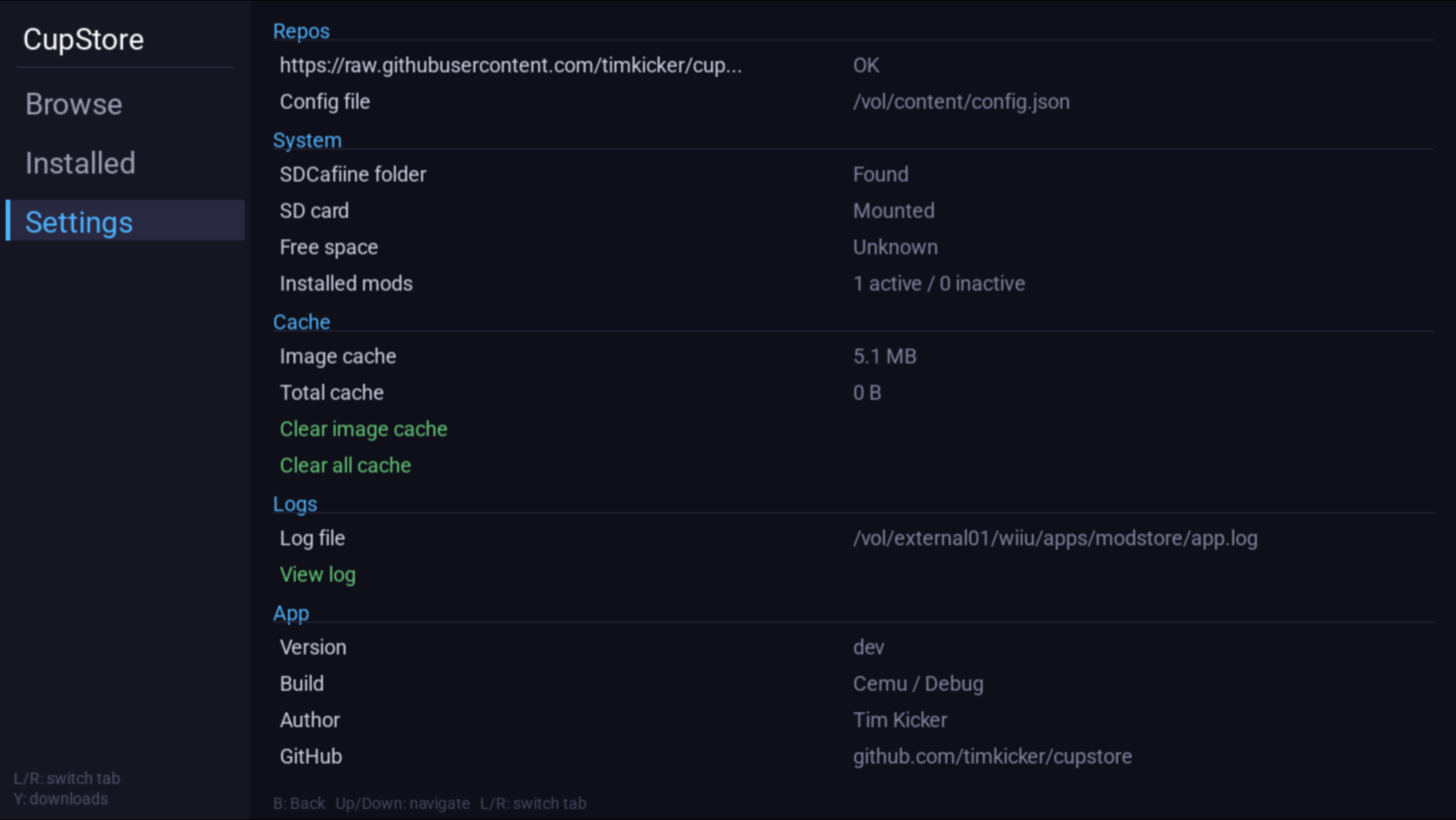
- Settings tab with repo management, cache control and log viewer
The hardware
Before getting into the development, it helps to understand the machine.
The Wii U has two CPUs. The Espresso is an IBM PowerPC 750-derivative with three cores at 1.24 GHz and runs games and homebrew. The Starbuck is an ARM processor that handles the OS internals. Homebrew runs exclusively on the PowerPC side.
The two processors run separate operating systems that communicate over an internal interface. The PowerPC side runs Cafe OS, Nintendo’s application environment where games and the home menu execute. The ARM side runs the IOSU, a security-focused microkernel responsible for hardware access, boot verification and enforcing code signing. All digital signature checks happen in the IOSU. The Cafe OS cannot directly access sensitive hardware or cryptographic material; it has to ask the IOSU, which decides what to allow. This separation means that even if you find a bug in a game and execute arbitrary code on the PowerPC side, you do not automatically have control over the whole system.
The storage situation is a mix. The main filesystem is proprietary, but the SD card slot is standard FAT32, accessible through POSIX-ish wrappers. Networking goes through the built-in Wi-Fi chip, exposed to homebrew via sockets.
The CPU architecture is the most immediately relevant constraint. PowerPC 750 is a late-1990s chip design, pre-dating a lot of what modern C++ assumes about hardware. Different endianness from x86 (big-endian), no SIMD extensions you would normally reach for and you are cross-compiling from a modern development machine to a platform that stopped being manufactured over a decade ago. The toolchain handles most of this transparently, but it shapes what you can realistically do and what will compile without changes.
The process model
The Wii U’s process model is more constrained than anything you would encounter on a desktop OS and understanding it is essential for writing software that actually behaves correctly.
Cafe OS does not allow arbitrary process creation. Instead, it reserves fixed memory regions for a predetermined set of process slots, identified by a RAMPID (a slot identifier that says where in memory a process lives). The slots are: kernel, root, a single background app slot, the home menu, an error display process and a single foreground app slot. That is the complete list. There is no fork(), no spawning additional processes at will. When you write a Wii U app, you are always the foreground app – RAMPID 7.
At any given time, exactly one foreground app and one background app can be loaded. The foreground app gets the bulk of available memory. The background app runs with significantly less, restricted to a single CPU core. When the user presses the Home button, the currently running app moves to the background slot and the home menu takes the foreground. When they return to the app, the foreground slot switches back. If they launch a second app from the home menu, whatever was in the background slot gets evicted.
This is not multitasking in the way a desktop OS does it. It is a carefully controlled slot-swap system. The OS keeps process data in memory for both slots simultaneously, but only executes one at a time.
One more thing worth noting about RAM: the Wii U ships with 2 GB of DDR3. Cafe OS consumes 1 GB of that (half the total RAM) just to run. Games and homebrew get the other 1 GB. This was considered a significant design problem even at launch, notable enough that Nintendo reportedly planned SDK updates to reduce OS memory footprint. Those updates never shipped before the platform was discontinued.
Additionally, the foreground app can claim an extra 40 MB of MEM1 while it is in the foreground. The moment the user switches to the home menu or a background app, that block gets automatically deallocated. The developer is responsible for managing this transition explicitly via callbacks.
What the Wii U learned from the Wii
The Wii U’s OS design makes a lot more sense when you know what it replaced.
The original Wii ran what Nintendo called IOS (the ARM-side operating system. No, not the one on the iPhone) as a set of versioned modules. Every piece of software, including games on disc, had a specific IOS version hardcoded into it. When a game booted, the ARM processor shut down and restarted with the IOS version that particular game required. This meant that multiple IOS versions coexisted on the console, that game discs often shipped with system update partitions to install the version they needed and that the ARM OS effectively rebooted every time you launched a game.
It also meant there was no shared, stable OS for PowerPC-side code to rely on. On the Wii, each game included its own copy of the system libraries, statically linked into the binary. There was no process isolation. No common kernel supervising applications. No shared address space management. A game on the Wii ran on essentially bare metal, with full hardware access and whatever runtime it bundled.
The most visible consequence of this was the Home button menu. When you pressed Home during a Wii game, the overlay that appeared was not part of the console’s OS – it was part of the game disc itself. Nintendo shipped a standard implementation of the Home Menu that developers were expected to include, but it was bundled per-game. This is why some third-party Wii games had subtly different Home Menu layouts, slightly different behavior or missing features that first-party titles had: the developers had varying degrees of attention to that part of the bundle.
The Wii U fixed all of this. Cafe OS is a proper shared kernel. Games link dynamically against system libraries that live in the console’s memory, not in their own package. The Home Menu is an independent OS process (RAMPID 5) that the kernel manages, it has nothing to do with whatever game is running. You press Home and Cafe OS transitions the foreground slot; the game does not get a say in what that looks like. The OS-level functions that the Wii Menu had to include: version tracking, update management, process control etc. were moved out of the menu app and into Cafe OS itself.
The IOSU side also changed significantly. Rather than a versioned, per-game ARM OS, the Wii U has a single unified IOSU that all software shares. It handles hardware access and security enforcement. Games cannot bypass it or bring their own version.
The tradeoff the Wii U made for this cleaner design: 1 GB of RAM permanently allocated to running all of this. On a 2 GB console that hurts. The Wii’s approach was chaotic but it did not cost you half your addressable memory.
Developing against the manufacturer
Nintendo has never been friendly toward homebrew. Their legal track record with fan-games, chip manufacturers and emulator developers is well-documented. They do not openly publish SDKs, do not document the hardware publicly and include mechanisms in every console designed to prevent unsigned code from running.
The technical mechanism is called a chain of trust. The boot ROM, burned directly into hardware and unmodifiable, checks the digital signature of the next boot stage before executing it. That stage checks the signature of the one after it. This extends all the way to the application level: every piece of software that runs on a Wii U must be signed by Nintendo’s private key. Without that signature, the system refuses to execute it. Since Nintendo’s private key is not public, you cannot simply produce valid signatures for your own code. The only way to run unsigned software is to find and exploit a bug in the system that bypasses the signature check.
This creates a specific development dynamic. Every piece of infrastructure the homebrew community uses: every header file, every system call wrapper, every emulator was built by reverse engineering. The WiiUBrew wiki is the main repository for this reverse-engineered knowledge. The people who wrote WUT (the main Wii U homebrew SDK) had to figure out what the OS system calls actually do by observing behavior, not by reading documentation. The Cemu emulator, which is the main development tool for Wii U homebrew, was built the same way.
There is also a persistent legal ambiguity. In most jurisdictions, modifying hardware you own is legal. Running custom code on a device you own is legal. Distributing tools that enable this sits in a grey area that Nintendo has historically been aggressive about. Aroma, the custom firmware most Wii U homebrew requires, only runs if the user has already applied an exploit to their own console. The software itself does not ship with exploits or copyrighted Nintendo code. Whether that is sufficient legal cover depends heavily on jurisdiction and circumstance.
Practically, this means building on shared infrastructure that could theoretically be targeted at any point, using tools with no official support if something breaks and working on a platform where the manufacturer is actively working against you. It also means the community that has formed around it is genuinely knowledgeable and collaborative in ways that official ecosystems often are not, because everyone is figuring things out together.
CoffeeShop itself does not contain Nintendo’s code. It is a C++ application that runs in the Aroma environment using community-maintained SDKs. It is a third-party software for a platform and does not enable piracy. But the context matters.
Aroma and the entry point
Getting homebrew to run on the Wii U at all requires bypassing Nintendo’s code signing. For most of the Wii U’s homebrew history, this meant using a browser exploit on every boot or relying on a vulnerability in a downloaded Nintendo DS game to inject code at startup (a technique called haxchi). These approaches worked but were fragile, hard to maintain and had limitations: you could not easily run plugins and homebrew applications at the same time and the whole setup had to be bootstrapped again if something went wrong.
The current standard is Aroma, a custom firmware environment developed over several years by Maschell. Aroma installs persistently to the SD card. After a one-time setup (which does require using an exploit, but only once), it starts automatically on every boot. The original Nintendo home menu keeps working normally. Official games run as usual. Aroma sits as a layer between the OS and everything running on top of it.
Technically, Aroma introduces two layers of extensibility. Aroma Modules are persistent pieces of code that stay resident in memory and can export functions to other components. One module handles kernel-level access, another handles patching OS functions, another provides the plugin backend. These run at all times in the background.
On top of modules, Aroma provides a plugin system. Plugins are loaded from the SD card and can intercept and modify OS behavior at runtime, including during gameplay. SDCafiine, the file-redirection plugin that mod support is built on, is an Aroma plugin. So is the component that makes homebrew apps show up on the home menu.
For app distribution, Aroma introduced the .wuhb (Wii U Homebrew Bundle) format. A .wuhb file packages the executable, app metadata (name, icon, author) and any content files the app needs into a single file. Place it on the SD card in the right folder and Aroma’s home menu integration will display it as a launchable app. This is the format CoffeeShop is distributed as.
For developers, Aroma means a reasonably stable API maintained by people who care about backwards compatibility. The alternative would be targeting raw system calls that can change between firmware versions with no notice.
One important consequence: the Home button is intercepted by Aroma before it reaches any application. VPAD_BUTTON_HOME never arrives in homebrew code. This has real implications for exit handling, covered in detail below.
The toolchain
WUT (Wii U Toolchain) is the homebrew SDK for the Wii U. It provides C/C++ wrappers around the native OS system calls. Without WUT you would be manually resolving function addresses from symbol tables and calling them with the correct PowerPC calling convention. WUT abstracts that into usable headers: coreinit for core OS functions, ProcUI for process management, vpad for gamepad input, nn::ac for network connections, nsysnet for sockets, sysapp for launching system applications.
Understanding why WUT exists the way it does requires a brief detour into how Wii U executables work. The native executable format is RPX, a modified ELF with compressed sections and Windows-style dynamic linking. Libraries use the same format with a different extension: RPL. All of the system libraries ( coreinit.rpl, gx2.rpl, vpad.rpl, nsysnet.rpl and dozens more) live in the console’s memory, permanently loaded. When a game or app launches, the OS loader dynamically links it against those libraries. coreinit.rpl is loaded first, before even the main executable, because everything else depends on it for memory management and thread primitives.
This is the opposite of how the Wii worked. On the Wii, each game statically bundled its own copy of every library it needed. On the Wii U, the libraries are shared OS infrastructure. The consequence for homebrew is that WUT provides stub libraries to link against at build time and the real resolution happens at runtime on the console against whatever coreinit.rpl and friends are actually loaded there. You call OSDynLoad_Acquire("gx2.rpl", &handle) and OSDynLoad_FindExport(handle, 0, "GX2Init", &fn) to get a function pointer – or you use WUT’s headers and the linker handles it automatically.
devkitPro is the package manager that provides the actual compiler. devkitPPC is the specific toolchain for PowerPC targets. It is a GCC cross-compiler that runs on x86_64 Linux, macOS or Windows and produces PowerPC binaries. The C standard library is newlib, not glibc. Some standard library functions you would expect to just work are absent or behave differently. Dynamic linking does not exist for homebrew in the traditional sense; the RPX format handles it through the OS loader, but you cannot use shared libraries you built yourself – only the system RPLs. This means binary size grows with every third-party library added, though on modern SD cards this is not a meaningful constraint.
The most notable absence is std::filesystem. Every directory operation is POSIX: opendir/readdir/stat/rename/mkdir. This affects more than convenience – it means every recursive directory walk, every existence check and every move or delete is written by hand. The recursive rmrf() that uninstalls a mod is about 20 lines of POSIX calls that std::filesystem::remove_all would replace with one. std::thread is similarly unavailable; threading goes through OSThread from coreinit. fopen() and the rest of stdio work fine via WUT’s wrappers. For sockets, read()/write() do not work on the Wii U – use recv()/send().
portlibs provides additional libraries cross-compiled for PowerPC: SDL2, libcurl, zlib, libpng, freetype, mbedTLS and more. These are the same libraries as on any platform, just compiled for the target.
The build system is CMake with wut.cmake included. One footgun: you must invoke /opt/devkitpro/portlibs/wiiu/bin/powerpc-eabi-cmake rather than plain cmake. devkitPro provides its own wrapper binary that sets the toolchain file and environment variables correctly. Running plain cmake produces subtly broken builds or fails to find portlibs entirely. The two relevant output steps:
wut_create_rpx()produces a.rpxfile, the Wii U’s native executable format. It is based on ELF (the same format Linux uses for binaries) with Nintendo-specific extensions.wut_create_wuhb()packages the RPX plus a content folder (fonts, images, config files) into a.wuhb(Wii U Homebrew Bundle). This is the distribution format Aroma uses.
The content folder is embedded into the bundle and accessible at /vol/content/ at runtime as a read-only filesystem. Writable data goes directly to the SD card. The .wuhb goes to SD:/wiiu/apps/coffeeshop/coffeeshop.wuhb and Aroma’s home menu integration picks it up automatically as a launchable app.
Compiler flags: -mcpu=750 -meabi -mhard-float. C++ exceptions can be enabled but have a performance cost. RTTI is optional. Static library link order in CMake matters: wut must be last in the target link libraries list or the linker produces mysterious undefined reference errors.
One consequence of developing for both Cemu and real hardware is that hardware-specific initialization – network bring-up, socket library init – is guarded behind a BUILD_HW compile flag in my case. In Cemu builds, those code paths are compiled out entirely. This is why certain bugs only appeared on hardware: the code triggering them was not present in the emulator build at all. It is a clean separation, but it means the emulator and hardware builds are not identical binaries.
Starting the project
The stack was C++17, SDL2 for rendering and UI, libcurl for HTTP, nlohmann/json for JSON parsing. The first working build had SDL2 initialization, a window, VPAD input reading and a basic config structure.
Most of the development happened in Cemu, a Wii U emulator for Linux, macOS and Windows. Cemu loads .wuhb files directly, maps the SD card to a folder on the host machine and makes iteration fast: build, reload, observe, repeat, without touching real hardware. It is itself a product of reverse engineering work by the community. For most development purposes, behavior in Cemu matches behavior on hardware. For some things it does not, which is why hardware testing still matters for every release, particularly for anything involving networking, filesystem operations or process lifecycle. All three of the exit freezes described later were hardware-only bugs that did not reproduce in Cemu.
Getting that first build running in Cemu took longer than expected because the CMake setup for WUT has footguns around how it expects devkitPro environment variables to be set. Once sorted, iteration got faster.
The architecture settled into clear components early: a repository system to fetch and parse mod metadata, an image cache for thumbnails, a download queue with a background worker thread, a filesystem layer to handle installation and activation, a conflict checker and an SDL2 UI that surfaces all of this.
The repository format
The repo format i designed is pretty straight-forward: a repo.json on any static web server lists available games:
{
  "formatVersion": 1,
  "games": [
    { "id": "mario-kart-8", "meta": "https://example.com/mario-kart-8/game.json" }
  ]
}
Each game.json contains game metadata (name, title IDs for different regions, icon URL) and a list of mods. Each mod entry has: ID, name, author, version, download URL (a ZIP), thumbnail, screenshots, tags, license, requirements and changelog. The formatVersion field exists so future breaking changes can be detected and handled gracefully.
Repos can be hosted anywhere that serves raw files: GitHub, Gitea, a VPS. Multiple repos are merged at runtime, so a user can pull from several sources simultaneously. The template repo includes a validation script and a GitHub Action that checks structure on every pull request.
One early trap: the test repo was hosted on Gitea. The URLs being used were /src/branch/main/ format, which serves the HTML page for the file, not the raw content. Gitea raw URLs use /raw/branch/main/. Every repository URL had to be corrected. Not interesting, but the kind of thing that wastes some time.
The process management loop
The fixed process slot model described earlier has a direct consequence for how every Wii U application must be structured.
Because the OS manages foreground and background transitions at the kernel level, your application cannot just run a game loop and exit when it wants. It has to participate in the OS’s state machine for as long as it is alive. The mechanism for this is ProcUI.
ProcUIProcessMessages() is the function that drives this. Called once per frame, it returns one of four states:
PROCUI_STATUS_IN_FOREGROUND      → normal operation, render and update
PROCUI_STATUS_RELEASE_FOREGROUND → OS needs the foreground; free MEM1 NOW
PROCUI_STATUS_IN_BACKGROUND      → suspended, running on one core, minimal work only
PROCUI_STATUS_EXITING            → OS wants the app gone; clean up and call SYSLaunchMenu()
The RELEASE_FOREGROUND state is the one that catches developers off guard. When the user presses the Home button, the OS does not just take the foreground – it first asks your application to release it. Your app must respond by freeing MEM1 resources and acknowledging the transition. If it does not respond, the OS waits. It does not time out. It just waits.
WUT wraps all of this in WHBProcIsRunning(), which returns false when the EXITING state is reached. The minimal version of the main loop is:
while (WHBProcIsRunning()) {
    update();
    render();
}
WHBProcShutdown();
This is not optional infrastructure. If you build your own exit condition and break out of the loop before ProcUI has naturally signaled shutdown, WHBProcShutdown() will hang. This was the root cause of the third freeze in the exit problem described below.
The other important constraint: on the Wii U, you never exit by returning from main(). The OS always needs to know what to launch next. Exiting always goes through SYSLaunchMenu() (or a similar sysapp call), which queues a transition request that ProcUI will eventually deliver as the EXITING state. The app loop drains to a halt through the message system rather than through a direct return path.
Networking
Network initialization is explicit and manual. nn::ac::Initialize() and nn::ac::Connect() bring up the Wi-Fi connection. socket_lib_init() initializes the socket stack. At shutdown, both must be finalized in order: socket_lib_finish() first, then nn::ac::Finalize(). Skip this and WHBProcShutdown() hangs. This was the second freeze.
libcurl works well on the Wii U with two important caveats. SSL certificate verification must be disabled (CURLOPT_SSL_VERIFYPEER set to 0) because there is no CA bundle available on the platform. This is a known platform limitation. Additionally, always set connection timeouts and low-speed limits. Without them, a stalled download hangs the worker thread indefinitely.
Progress reporting uses CURLOPT_XFERINFOFUNCTION. The callback does double duty: it updates the progress shown in the download queue UI and it checks a cancellation flag. If the flag is set, the callback returns 1, which tells libcurl to abort immediately. This is the correct mechanism for stopping a download thread: do not try to kill it from outside, tell curl to stop cooperating and let the thread exit naturally.
SDL2 on the Wii U
SDL2 via portlibs runs well. The renderer backend is OpenGL ES internally, but that is transparent through the SDL2 abstraction. SDL2_ttf handles fonts, SDL2_image handles PNG and JPG loading, SDL2_mixer handles audio.
The most important SDL2 performance rule: SDL_CreateTextureFromSurface is expensive. Never call it per frame like i did at first (yeah i know…). The pattern throughout CoffeeShop is to create textures once and cache them, then call SDL_RenderCopy in the render loop. For text, TTF_RenderUTF8_Blended produces a surface, that surface becomes a texture and the texture stays alive as long as the text content does not change.
SDL texture creation must happen on the main thread. This matters for the image cache: a background thread fetches image data via libcurl and writes raw bytes to the SD card cache, then sets an atomic flag. The main thread checks the flag and creates the SDL texture on the next frame. Moving texture creation into the background thread causes crashes.
Semi-transparent overlays require setting SDL_SetRenderDrawBlendMode to SDL_BLENDMODE_BLEND before rendering the overlay rectangle, then resetting it afterward. Without this, the default blend mode does not composite correctly and text behind the overlay bleeds through.
Thumbnail handling
Thumbnails presented two problems. First, loading image data from the network on every start would be slow. The image cache writes raw bytes to SD:/wiiu/apps/coffeeshop/cache/ on first download and loads from there on subsequent starts.
Second, aspect ratio. SDL_RenderCopy without a source rectangle scales the image to fill the entire destination rectangle, stretching anything that is not exactly the right dimensions. The fix is a center crop:
int srcH = (texture_width * target_height) / target_width;
SDL_Rect srcRect = {0, 0, texture_width, srcH};
SDL_RenderCopy(renderer, texture, &srcRect, &destRect);
This scales to the full target width and crops vertically from the top, preserving aspect ratio while filling the card completely.
Input handling
VPAD is the WUT API for the Wii U GamePad. VPADRead() fills a VPADStatus struct with button state and analog stick values. Buttons are bitmasks. As noted, VPAD_BUTTON_HOME never arrives; Aroma intercepts it. Exit must go through SYSLaunchMenu().
Analog sticks return float values from -1.0 to 1.0. There is no automatic deadzone, so you implement your own to prevent drift on worn hardware. There is also no automatic key repeat for held buttons, so navigation repeat requires manual timer tracking.
Grid navigation uses modulo arithmetic for row and column calculation. Overflow navigation (pressing right at the end of a row advances to the next game, pressing left at the start goes to the previous) was added after initial testing and makes the browse view noticeably more comfortable than requiring a dedicated game-select button.
There was a button conflict with the Y button. It was originally mapped to both the download queue (in the browse tab) and deinstall (in the installed tab). Switching tabs while the queue was visible produced confusing behavior. The download queue toggle moved to Plus and Y became exclusively an installed-tab action.
The download queue
The queue runs a background worker thread. The main loop pushes download requests into a thread-safe queue. The worker picks them up, runs the curl transfer to a temporary file, validates the ZIP magic bytes, extracts to the sdcafiine folder and writes a modinfo.json into the mod directory:
{
  "id": "my-mod",
  "version": "1.2.0",
  "repo": "https://example.com/repo.json"
}
The installed scanner reads these to know what is installed, compare against current repository versions and flag available updates. Mods without a modinfo.json are treated as corrupted and flagged at startup.
Deactivating a mod moves its folder from SD:/wiiu/sdcafiine/TitleID/ModID/ to SD:/wiiu/apps/coffeeshop/disabled/TitleID/ModID/. Reactivating moves it back. Folder rename rather than copy, to minimize SD card write operations. SDCafiine only reads from the sdcafiine directory, so absent folders are simply inactive.
The region problem
SDCafiine matches mods by Title ID. The same game has a different Title ID per region: Mario Kart 8 is 000500001010eb00 in Japan, 000500001010ec00 in the US and 000500001010ed00 in Europe. A mod installed under the European Title ID will not load on a US console – SDCafiine checks the exact ID of the running game and finds nothing.
The repository format handles this by listing multiple Title IDs per game entry. When a user installs a mod for a game that has more than one Title ID in the repository, CoffeeShop cannot determine the console’s region automatically and has to ask. A RegionSelectScreen appears, the user picks their region and the download goes to the correct Title ID path. It is one extra interaction per game and only shows up the first time for each game.
At startup, CacheManager::cleanupStaleZips() and cleanupCorruptMods() run before the UI is shown. The first removes half-finished .zip files left over from interrupted downloads. The second finds mod directories missing a modinfo.json and removes them. Both are a direct consequence of a download process that can be interrupted at any point – by a crash, a network drop or the user powering off.
Conflict detection
Activating a mod runs a conflict check first. The ConflictChecker takes the file list of the mod being activated and the file lists of all currently active mods and returns which mods conflict and which specific files collide. If there is a conflict, a dialog shows the affected mods and up to three example file paths.
The conflict dialog layout had significant problems early on. Text overflowed card boundaries, buttons were wrongly positioned, the semi-transparent overlay caused text to bleed through because SDL_BLENDMODE_BLEND was not being set before rendering the overlay rectangle. The dialog was rebuilt with fixed card dimensions, a defined left margin for all text elements, a divider line above the buttons and explicit line spacing.
Audio
SDL2_mixer handles sound effects and background music. There is a three-state music toggle: off, main theme, alternative theme. Sound effects for navigation, download start, download end, errors, mod activation and deactivation. The music setting persists in config.json.
The shutdown sequence is order-sensitive: Mix_FreeChunk, Mix_FreeMusic, Mix_CloseAudio, Mix_Quit. Out of order or skipped, the audio subsystem shutdown hangs. Another item on the “must finalize explicitly” list for this platform.
Logging and debugging
There is no convenient printf-to-terminal while the app is running on hardware. The logging setup has three layers, each covering a different failure window.
Early log. main() opens early.log on the SD card immediately after WHBProcInit(), before the main logger or any other subsystem initializes. Every write is followed by fsync(). This is not caution – it is the only way to capture crashes that happen during initialization, before the buffer would ever be flushed. If the app crashes during startup, early.log contains every message up to the last line written before the crash.
UDP log. WHBLogUdpInit() streams log output over UDP to a udplogserver running on the development machine. This is the primary tool during active development in Cemu, where the network is always available. On hardware it works once Wi-Fi is up, which is not guaranteed during early startup or shutdown.
File logger + in-app viewer. The main Logger class writes to app.log on the SD card and keeps a rolling in-memory buffer of recent lines. The Settings tab has a built-in log viewer: pressing “View log” opens a scrollable overlay showing those lines, color-coded by severity (errors in red, warnings in yellow). This matters specifically for hardware debugging without a development machine attached – the log is readable directly on the console.
For crashes, Aroma’s crash handler dumps register state. Stack traces without debug symbols are hard to read, but the combination of early.log, the file logger and the crash dump is usually enough to locate the problem. All of the exit freeze diagnosis below was done by adding log calls before and after every cleanup step and looking at where the output stopped.
The exit problem i had
The first hardware test ran correctly until you tried to leave. Every exit path froze the console.
Freeze 1: the download worker
The initial exit approach set m_running = false to break the main loop, then called join() on the worker thread. join() never returned because the thread was blocked inside a libcurl network call.
Fix: the cancellation flag in the curl progress callback. When set, the callback returns 1, telling libcurl to abort the transfer. libcurl returns, the thread exits naturally, join() completes. This is the correct pattern: do not attempt to terminate the thread from outside, tell curl to stop cooperating.
Freeze 2: the network stack
After the thread fix, the app still froze. The elog() trace showed it hanging inside WHBProcShutdown(). Cause: nn::ac::Initialize() and socket_lib_init() were called at startup, but nn::ac::Finalize() and socket_lib_finish() were never called before WHBProcShutdown(). The network stack does not clean itself up. Call order: socket_lib_finish() first, then nn::ac::Finalize().
Freeze 3: ProcUI state
After both fixes, still a freeze. The cause was pretty subtle.
WHBProcShutdown() expects to be called after WHBProcIsRunning() has naturally returned false through the ProcUI message loop. If you break out of the loop early with your own boolean, WHBProcShutdown() finds ProcUI in an intermediate state and waits for a state transition that will never arrive.
The actual fix was to not call WHBProcShutdown() at all. The shutdown sequence calls SYSLaunchMenu(), which transfers control back to the home menu. The OS terminates the process as part of that transition. WHBProcShutdown() never gets reached and there is nothing left to hang. The comment in the source is explicit: WHBProcShutdown() omitted - hangs when loop exits via m_running=false.
The main loop condition reflects the hybrid approach:
while (m_running && !m_screens.empty() && WHBProcIsRunning()) {
    update();
    render();
}
// WHBProcShutdown() omitted - hangs when loop exits via m_running=false
SYSLaunchMenu();
It is not the textbook ProcUI pattern. It works because the OS does not require a graceful WHBProcShutdown() when SYSLaunchMenu() is used – the process is cleaned up by the OS regardless.
None of the three freezes reproduced in Cemu. The emulator’s ProcUI implementation is more forgiving about internal state at shutdown. All three required real hardware to manifest.
The app icon issue i had as well
wut_create_wuhb() has an ICON parameter for this and the icon showed correctly in the home launcher.
When the app tried to load the icon as an SDL texture at runtime for display inside the app itself, the file was not there. The ICON parameter embeds the image into the WUHB bundle’s metadata section, which is handled by the OS and not exposed as a file path at /vol/content/. The content folder and the metadata section are separate.
Fix: copy icon.png into meta/content/ as well. That path gets embedded into the content bundle and is accessible at /vol/content/icon.png at runtime. The content copy and the metadata copy are the same file duplicated into two places in the bundle.
The icon rendering also needed a center-crop. The coffee cup graphic has whitespace around it and without cropping it renders smaller than it should. Same crop calculation as thumbnails.
Settings performance (because i was just stupid i guess)
The Settings tab was extremely slow. Multiple seconds of delay when switching to it and noticeable lag on every input event within it.
The cause: buildSettingsItems() was being called in two places, inside handleSettingsInput() on every input event and inside renderSettings() on every frame. Inside buildSettingsItems() was InstalledScanner::scan() traversing the sdcafiine folder, dirSize() recursively measuring cache folders and statvfs() for free space. All SD card I/O, running 60 times per second plus on every button press.
Fix: cache the built items as a member variable. Rebuild only on onEnter() and after any button action that changes state. A m_textureCacheDirty flag separates item data from rendered textures – items are rebuilt rarely, textures are rebuilt from the item data when the dirty flag is set and neither touches the SD card in the render loop.
The second performance issue was in renderText(). The original called TTF_RenderUTF8_Blended, SDL_CreateTextureFromSurface and SDL_DestroyTexture on every invocation. With 20 visible items that is 20 texture allocations per frame. Fix: cache text textures in the item structs inside buildTextureCache(), use only SDL_RenderCopy in the render loop. buildTextureCache() runs once when the dirty flag is set; after that the render path is pure GPU copy.
Tests
The test setup uses Catch2 and runs as a normal x86_64 binary on the development machine. Only components without WUT, SDL or curl dependencies are testable this way.
In practice that covers the ConflictChecker (7 scenarios: no conflict, single conflict, multiple conflicts, the three-file display cap, empty mod list, empty active list, both empty), RepoManager::parseGameFromJson (11 scenarios: valid input, missing required fields, invalid mod IDs, invalid download URLs, optional fields absent, mix of valid and invalid mods) and InstalledScanner::hasUpdate for version comparison edge cases.
The goal is not exhaustive line coverage. It is confidence that parsing will not crash or silently accept garbage when a community repository has a mistake and that conflict detection is correct at the boundary cases.
CI runs through GitHub Actions on every push using devkitPro’s Docker images for the build step.
Cemu vs. real hardware
Cemu is excellent for development iteration: fast builds, no SD card handling, debuggable on the host. It loads .wuhb files directly and maps /vol/external01/ to a configurable host folder.
It does not behave identically to hardware. Network timing differs. Some WUT calls behave slightly differently. ProcUI diverges in subtle ways, as demonstrated by all three exit freezes being hardware-only. Crashes that appear on hardware do not necessarily reproduce in Cemu.
Practical workflow: develop in Cemu for most iterations, test on hardware for every release candidate and for anything touching network, filesystem or process lifecycle.
Gallery
CoffeeShop is open source under GPLv3. The latest release is on GitHub. It requires a Wii U with Aroma installed and a community-hosted repository to pull mods from. A repository template is also available on GitHub for anyone who wants to host their own.
If you want to go deeper on how the Wii U homebrew ecosystem works, Maschell’s blog series on building a homebrew environment for the Wii U and the Aroma release post are the most thorough technical explanations available.